
Why Doesn’t the Manufacturer’s Configuration App Connect?

When in typical use, it’s not necessary to connect to a beacon. A beacon just advertises and is detected by a smartphone or Bluetooth gateway. However, to initially set up a beacon you usually connect via a smartphone app. The app might not connect for a number of reasons. Here are some tips:

  • Most beacons need to be put into ‘connectable’ mode. For example, for most AnkhMaway beacons this means tapping them sharply on a table until they ring – they remain connectable for 45 secs and once connected remain so until you have configured the beacon. For Axaet and Meeblue beacons they stay connectable for a few minutes after turning them on.
  • Make sure you are connecting to the correct beacon. This is especially important if you are seeing multiple Bluetooth devices in the list. For example, we had one customer who hadn’t removed the plastic battery slip and had been trying to connect to some other Bluetooth beacon/device.
  • Connecting, via what is a wireless interface, might not work first time. While most connections do happen first time, there can be radio interference and radio signal reflections that can cause the connection to fail. Some configuration apps re-try if the first connect fails while others don’t. Make sure you have tried a few times before concluding a particular scenario doesn’t work.
  • Some phones have a faulty Bluetooth beacon stack. That’s the Bluetooth software built into your phone. While you might be able to view the beacon, connecting to it to change settings uses more advanced functionality that’s sometimes faulty. Over time, we have discovered about 5% of our customers have such problems, more so on Android. It’s a much more common problem than a faulty beacon. You can isolate this possibility by trying a different phone and/or different phone OS type.
  • Don’t try connecting from more than one phone at a time. When connected, that phone has exclusive access to the beacon and other phones won’t be able to see the beacon and connect.
  • Make sure you are using the correct password to connect. It’s not the password on the sticker which is the web site technical area password.
  • Try rebooting your phone to reset the internal Bluetooth software.
  • Try resetting the beacon by removing and replacing the battery (where possible). This isn’t the same as turning off via a button press which usually only puts the beacon into hibernation and doesn’t restart the device.
  • Some configuration apps have known bugs. Read the BeaconZone technical area for your particular beacon manufacturer where we document known problems and workarounds.
  • The beacon could be faulty. This is actually a very rare occurrence and you should initially be considering other more likely possibilities (above). You can isolate this possibility if you have another similar beacon. Please contact us for replacement if you conclude you have a faulty beacon.
Where Can I Find a Beacon Solution that Does xyz?

We get lots of enquiries along the lines of:

“Where Can I Find a Beacon Solution that Does xyz?”

Where xyz could be one of many things. Unfortunately, we don’t have a full knowledge of what’s out there, particularly because it’s continually changing.

We maintain a BeaconZone Solutions Directory where we list solutions we have found in the categories of marketing/retail, industry/logistics, buildings/staff, visitor spaces, transportation, education and personal.

If you can’t find a solution, we also create custom solutions.

What is Bluetooth Beacon Technology?

Bluetooth beacons use Bluetooth LE, a low power version of Bluetooth to repeatedly send out a short amount of data typically up to 50m but in some cases hundreds of metres. The data usually includes an identifier in various standard formats such as iBeacon or Eddystone. It can also include sensor data.

The beacon advertising can be picked up by other Bluetooth LE devices such as smartphones, WiFi gateways to send to a server and single board computers such as the Raspberry Pi.

The key features are:

  • Low power and hence can work for up to years on battery power
  • Interoperability with a large number of other Bluetooth LE devices
  • The underlying Bluetooth LE protocol is resilient to electrical interference
  • Sensing without the need for soldering or custom electronics

To learn more about the physical aspects of beacons and the actual advertising, see our article on What are Beacons?

Read more about beacons for IoT sensing.

What’s the Affect of Changing the Power on the iB003N-PA?

The iB003N-PA has a range up to 300m because it uses the RFAXIS X2401C 2.4GHz amplifier to increase the range.

iB003N-PA

When you use the manufacturer app to change the power output by a beacon, you are changing the power output by the Nordic nRF51 System on a Chip (SoC) that is usually fed to the antenna. In the case of the iB003N-PA, the RFAXIS X2401C instead receives the signal, amplifies it and sends it to the antenna. The resultant change in output is:

SoC Setting X2401C Output
0dbm 20dBm
4dbm 20dBm
-5dbm 15dBm
-10dbm 10dBm

20dBm is the maximum allowable output for class 1 Bluetooth. There’s no difference whether you set to 0dBm or 4dBm, the output will be 20dBm. Even at a low power setting, -10dbm, the amplified output is 10dBm which is relatively high compared to the nominal 0dBm for most beacons. That’s just over 3x the power (3dBm change is a doubling of power) of a normal beacon. You can see that this beacon is primarily designed for long distance and there’s no need to change the SoC power from the default 0dBm = 20dBm.

View our ultra long range beacons

What is iBeacon Technology?

We sometimes get asked “What is iBeacon Technology?”. In terms of the beacon itself, iBeacon doesn’t imply much. The underlying Bluetooth does most of the hard work. iBeacon is only one of many possible formats of standard Bluetooth advertising.

The iBeacon advertising consists of three identifiers UUID, major and minor. We have an article explaining how these are usually set up.

The more useful functionality is in iOS itself. Apps can declare an interest in particular beacons and be triggered even when the app is not running. The triggering is usually used to cause a notification on the phone that the user can tap on to do more. If the app is already open, it can look for beacons and display appropriate app content.

Android may also trigger and scan for iBeacons but this is in the context of scanning for Bluetooth advertising as opposed to specific iBeacons.

Learn More

What are Beacons?

Ways to Use Beacons

Buy iBeacons

How Does Using Beacons for Tracking Compare with the Use of RFID?

The main difference between beacons and RFID is the range. RFID only works up to 1m while beacons typically reach 50m to 100m, even more for specialist beacons. It’s also possible to get an indication of distance to the beacon whereas with RFID it’s just ‘seen’ or ‘not seen’.

RFID tags are less expensive than beacons. However, as the range of beacons is much larger, fewer readers are required thus compensating for the extra cost. It’s also possible to totally cover a much larger area.

How to Set Up iB003N Motion Triggered Broadcast?

The iB003N has an accelerometer that can be used to cause this beacon to only broadcast when it has been moved. This can be used to save battery power or as an alert that something, that shouldn’t move, has been moved. For example, we have a customer putting them on warehouse racking legs to detect when the forklift truck has crashed into them.

The iB003N manufacturer documentation on motion triggered broadcast is split over many sections of the user guide making understanding setup harder than it needs to be. In fact, it’s very simple. Connect to the beacon using the eBeacon app and set Service 0xFF70, Characteristic 0x2A80 (the beacon state) to 0x04. The beacon will now only transmit when moved.

How to Open the iB004N Case?

There’s a manufacturer-supplied video in our Ankhmaway technical information that shows how to open the iB004N. We haven’t been happy with this video for some time. Firstly, if you open the beacon as shown you are likely to crack the case. Secondly, it shows someone wielding what looks like a metal screwdriver that, given where it’s used, could easily short or damage the circuit board. Thirdly, if you snap it shut as shown, you will snap off the retaining lugs.

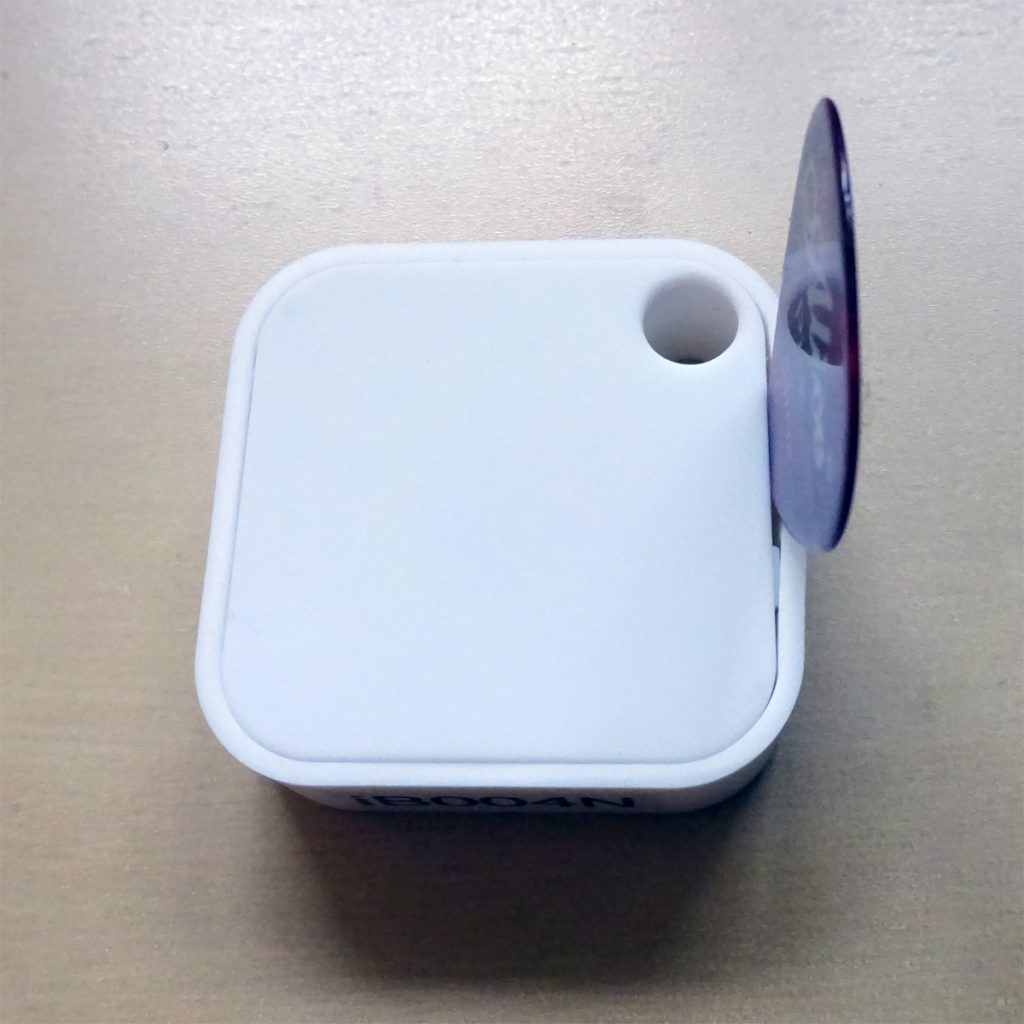
We have found that the best way to open the iB004N is with a plastic sharp edge such as a guitar pick. Push it down as shown, where there isn’t a retaining lug:

ib004n_open_case_smaller

Lever and the case top pops off. Use a plastic tool to lever up the printed circuit board and replace the battery.

To put the lid back on, first place the lid side with the two lugs into the corresponding two holes in the side. Push the lid down and use the plastic sharp edge, in the same position as you used to take the lid off, to widen the case slightly as you push the lid right down. This way, the lug won’t snap off.